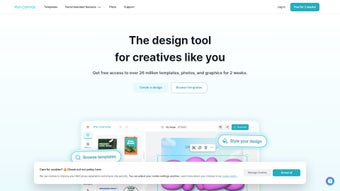

Download MiriCanvas – AI‑Powered Design Tool for Fast, Free, Secure Graphics
Introduction
In today’s hyper‑connected marketplace, visual content has become the primary language of communication. Brands, agencies, and solo creators are under constant pressure to produce eye‑catching graphics that not only look professional but also align perfectly with brand guidelines and platform specifications. Traditional design software, while powerful, often requires a steep learning curve, expensive licenses, and powerful hardware. That’s where AI‑driven, cloud‑based solutions step in to bridge the gap between creativity and efficiency. MiriCanvas is one of the most promising entries in this space, offering a zero‑install, browser‑first experience that leverages machine‑learning models to automate repetitive design tasks while still giving users full creative control.
The platform positions itself as a universal design companion for marketers, social‑media managers, small‑business owners, and even hobbyists who need to churn out high‑quality visuals on a tight schedule. By combining an extensive library of pre‑made templates with an AI engine that can adapt colors, fonts, and layouts to match your brand, MiriCanvas promises to cut design time by up to 70 %. Moreover, its collaborative features mean that teams can work together in real time, eliminating the endless back‑and‑forth of email attachments and version confusion.
Security and cost are also front‑and‑center. All assets are stored on GDPR‑compliant servers with end‑to‑end encryption, and the free tier provides a generous set of tools that are sufficient for occasional users. For professionals who need premium assets and higher‑resolution exports, the paid plan is priced competitively at $49 USD per year, a fraction of the cost of traditional desktop suites. In the sections that follow, we’ll explore MiriCanvas in depth—its core features, how to get started, compatibility across devices, and the pros and cons that matter most to potential users.
Overview
MiriCanvas is a web‑based, AI‑enhanced design platform that promises to streamline the entire creative workflow. Whether you are a seasoned graphic designer, a marketer juggling dozens of social‑media assets, or a complete beginner looking to produce professional‑looking visuals without a steep learning curve, MiriCanvas positions itself as the all‑in‑one solution. Powered by modern machine‑learning algorithms, the application offers a library of AI‑assisted templates that automatically adapt to your content, color preferences, and branding guidelines. The interface is built for speed: drag‑and‑drop components, instant preview, and a one‑click “Generate Design” button let you move from concept to final graphic in minutes instead of hours. Because it runs entirely in the browser, there is no need for bulky installations or expensive hardware—just a stable internet connection and a modern browser.
Beyond speed, MiriCanvas focuses on collaboration. Teams can comment, approve, or tweak designs in real time, with every change tracked in a version history that allows instant rollbacks. The free tier provides a generous set of templates and basic AI tools, while the full version unlocks premium assets, higher‑resolution exports, and advanced customization options. Security is baked in: all projects are encrypted at rest and in transit, meeting GDPR and CCPA standards. In short, MiriCanvas aims to democratize high‑quality design by making AI‑driven creativity accessible, secure, and affordable for everyone.
Key Features & How It Works
- AI‑Assisted Template Engine: Choose from hundreds of professionally designed templates that automatically adapt to your text, images, and brand colors using deep‑learning models.
- One‑Click Design Generation: Input your headline, upload a logo, and let the AI propose multiple layout variations in seconds.
- Cross‑Platform Asset Export: Export designs in PNG, JPEG, SVG, PDF, and even animated GIF formats, ready for social media, print, or web use.
- Real‑Time Collaboration: Invite teammates to edit, comment, or approve designs directly within the browser, reducing email back‑and‑forth.
- Brand Kit Integration: Save your brand fonts, colors, and logos once; the AI respects these settings across every new project.
- Responsive Canvas: Designs automatically resize for different platforms (Instagram post, Facebook cover, LinkedIn banner) while preserving layout integrity.
- Secure Cloud Storage: All projects are stored encrypted on EU‑compliant servers, ensuring privacy and data protection.
- Version History & Undo Stack: Every change is tracked, allowing you to revert to any previous version with a single click.
- Free & Paid Plans: The free tier includes 50+ templates and basic AI generation; the premium plan unlocks 500+ premium templates, high‑resolution exports, and priority AI processing.
How to Get Started Quickly
After creating an account, you land on the dashboard where you can start a new project or explore the template gallery. Selecting a template launches the AI‑assistant sidebar: you simply fill in the required fields (headline, sub‑text, image placeholders) and click “Generate.” Within seconds, the engine proposes three distinct visual concepts. You can refine any suggestion by swapping images, tweaking fonts, or adjusting spacing. The “Export” button then offers format options and resolution settings. Because the entire process is handled in the cloud, you never have to install heavyweight software or manage updates; MiriCanvas automatically rolls out new AI models and template packs as part of its regular service cycle.
The AI workflow is deliberately transparent. Under the hood, a convolutional neural network analyzes the visual hierarchy of each template, while a natural‑language processing module interprets your copy to suggest optimal typographic emphasis. This dual‑approach ensures that the generated designs are not only aesthetically pleasing but also convey the intended message effectively. Users who prefer manual control can still drag‑and‑drop individual elements, adjust padding, or replace AI‑suggested assets with custom graphics. This flexibility makes MiriCanvas suitable for both quick turn‑around projects and more detailed branding exercises.
Installation, Usage & Compatibility
Installation & First‑Time Setup (Zero‑Download)
MiriCanvas lives completely online, so there is no traditional installation process. To begin, navigate to miricanvas.com using any modern web browser (Chrome, Edge, Firefox, Safari). Click “Sign Up,” enter your email address, and verify the confirmation link. Once logged in, you are greeted by a clean, responsive UI that adapts to desktop, tablet, or mobile screens. Because the platform is web‑based, updates are instantaneous—new AI features and template collections appear automatically without any action required from the user.
Step‑by‑Step Usage Guide
- Choose a Project Type: Select “Social Media,” “Marketing Material,” “Presentation,” or “Custom Size.”
- Pick a Template: Browse the AI‑assisted library; filter by industry, color palette, or format.
- Enter Your Content: Fill in headline, body text, and upload images or logos.
- Generate Options: Click “Generate Design.” The AI produces three layout variations.
- Customize: Drag‑and‑drop elements, change fonts, adjust spacing, or replace images.
- Collaborate: Invite teammates via email; they can comment or edit directly.
- Export: Choose file format and resolution; click “Download” to save locally.
Operating System & Browser Compatibility (Windows, macOS, Linux, Chrome OS, Android, iOS)
MiriCanvas is designed to be truly cross‑platform. Since the application runs in the browser, it works on any operating system that supports modern web standards, including:
- Windows 10, 11
- macOS Ventura, Monterey
- Linux distributions with recent kernels (Ubuntu, Fedora, Debian)
- Chrome OS
- Android 8.0+ (via Chrome or native WebView)
- iOS 13+ (Safari or Chrome)
The recommended browsers are the latest versions of Google Chrome, Microsoft Edge, Mozilla Firefox, and Apple Safari. For the best performance—especially when generating high‑resolution assets—ensure your browser allows WebGL and has hardware acceleration enabled.
Pros & Cons
- Pros:
- AI‑driven design speeds up creation by up to 70 %.
- No software download or hardware constraints.
- Rich library of templates for diverse industries.
- Secure, encrypted cloud storage compliant with GDPR.
- Real‑time collaboration reduces feedback loops.
- Free tier sufficient for occasional users.
- Cons:
- Requires a stable internet connection; offline work is not supported.
- Advanced premium templates locked behind a paid plan.
- Export resolution limited to 300 dpi on free tier.
- Customization options, while robust, may feel limited for expert designers seeking pixel‑perfect control.
FAQ – Frequently Asked Questions (FAQPage)
Is MiriCanvas truly free or are there hidden costs?
MiriCanvas offers a completely free tier that includes over 50 templates, basic AI generation, and standard‑resolution exports. The premium plan, priced at $49 USD per year, unlocks the full template library, high‑resolution (300 dpi) exports, and priority AI processing. There are no hidden fees or mandatory upgrades.
Can I use MiriCanvas for commercial projects?
Yes. Both the free and premium versions grant you a commercial‑use license for any design you create within the platform. Just be sure to respect any third‑party asset licenses (e.g., stock photos) that you import.
How does MiriCanvas protect my data?
All user data, including uploaded images and design files, are stored encrypted at rest on EU‑based servers. Connections use HTTPS/TLS 1.3, and the platform complies with GDPR and CCPA standards.
Is there an offline mode for MiriCanvas?
Currently no. Because the AI generation and template library are cloud‑based, an internet connection is required for full functionality. However, you can export completed designs and continue minor edits locally using any image editor.
How often are new templates and AI models added?
MiriCanvas rolls out fresh template packs and AI model updates on a monthly basis. Premium subscribers receive early access to the newest assets.
Conclusion – Should You Download MiriCanvas?
MiriCanvas fills a distinct niche in the crowded design‑software market by marrying AI convenience with a zero‑install, browser‑first experience. For freelancers, small businesses, and marketing teams that need to churn out high‑quality graphics quickly, the platform’s one‑click generation and collaborative features translate into real‑world time savings. While power users may miss deep‑pixel‑level controls found in desktop‑only suites like Adobe Photoshop, the trade‑off is a dramatically lower learning curve and a cost structure that scales from free to a modest annual fee.
Security‑conscious users will appreciate the encrypted cloud storage and GDPR compliance, while the cross‑platform compatibility ensures that you can work from a Windows laptop, a MacBook, or even a smartphone without missing a beat. The free tier provides enough firepower to test the concept on a few projects, and the premium plan unlocks advanced capabilities for those who need high‑resolution assets and a broader template selection. If you’re ready to upgrade your visual output without investing in expensive software licenses, click the “Get Started” button below and start creating with MiriCanvas today.
Get Started with MiriCanvas – Free Account
Overall Rating: 4.5 / 5
Pros: AI speed, web‑based convenience, strong collaboration, secure storage.
Cons: Requires internet, limited offline editing, premium needed for highest‑res exports.



.png)



